DocuPro
Windows document management platform

Document management
that fits your business

Securely capture, organize, search, and process documents on a platform configured around your organization's own document types, metadata, permissions, and workflows.
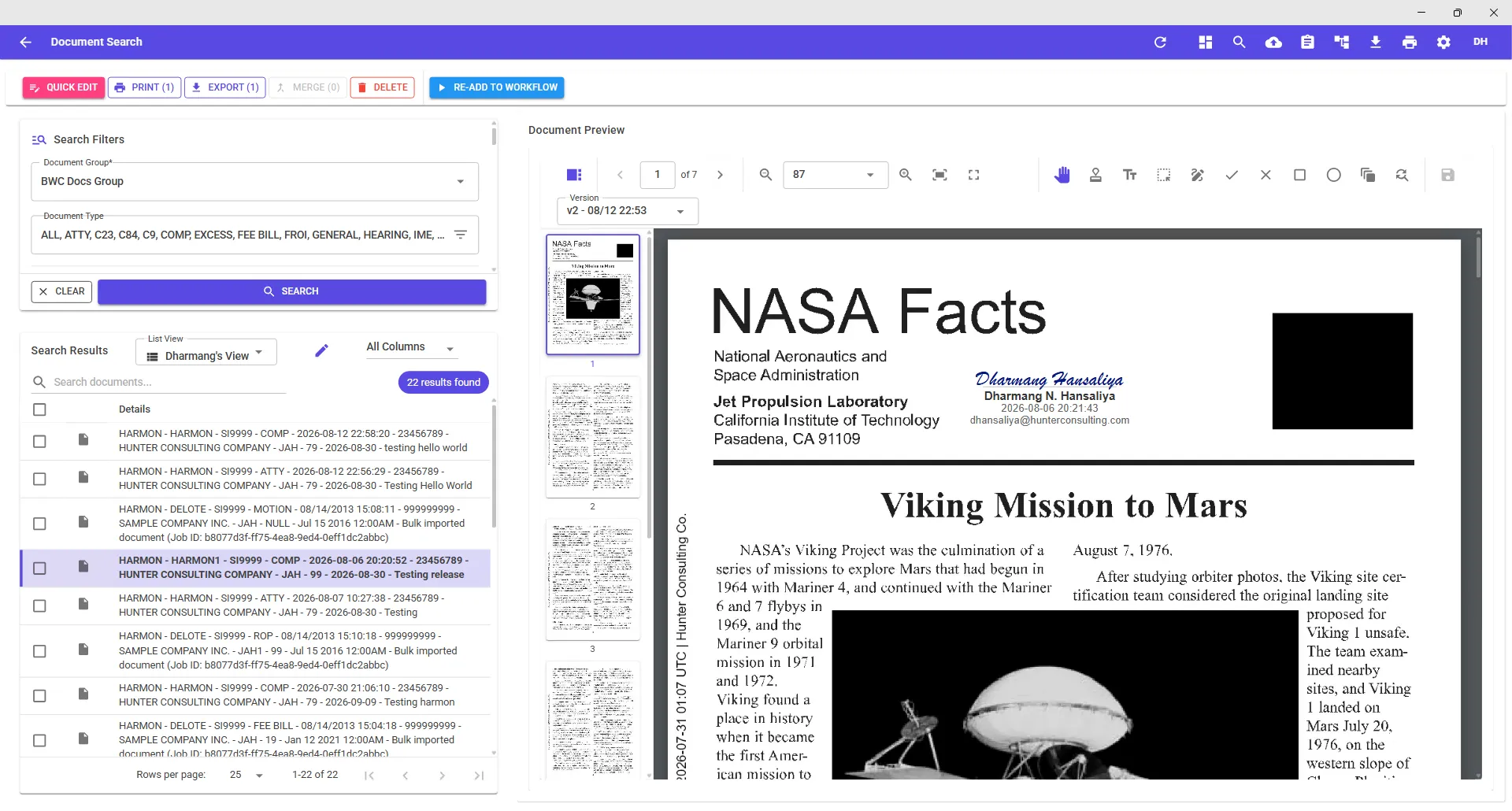
DocuPro — Document Search
DocuPro document search with results and document preview
Capture from anywhereYour metadata, your rulesWorkflows with tasks & queuesEntra ID single sign-onVersion-controlled originalsLarge-scale migration
01 — Capture

Get documents into DocuPro from anywhere

Upload, print, scan, email, or migrate. Your people keep working the way they already do, and the documents still land in DocuPro fully indexed.

Direct upload
Index as you import, straight from the Import Document screen.
Virtual Print Driver
Print from any Windows program to GoDocuPro VPD to file it.
Batch scanning
Patch-T separator sheets split a stack into documents automatically.
Outlook add-in
File mail and attachments without leaving the inbox.
Import email address
Every user gets one. Forward mail, attachments come with it.
Bulk import jobs
Tuned to your hardware, with retry for failed uploads.
Learn more about capture →
02 — Configure

Configure DocuPro around your business, not the other way around

Document groups, document types, index fields, external lookups, folder permissions, security rules, and workflows are all yours to define. The same platform below is set up two completely different ways.

Insurance carrier
Document type
Claim
Index fields
Claim Number, Employee, Employer, Date of Injury
Workflow
Intake → Review → Approval → Complete
Security
Adjusters see only claims assigned to their department
Notifications
Reviewer is emailed when a claim enters their queue
Accounts payable
Document type
Invoice
Index fields
Vendor, Invoice Number, Amount, Department
Workflow
Received → Review → Approval → Paid
Security
Department-based access, enforced by index values
Notifications
Scheduled reminder for invoices sitting past due date
Learn more about configuration →
03 — Automate

Turn documents into business processes

Route documents to the right person, at the right stage, with the right tasks attached. Nothing waits in an inbox for someone to notice it.

CAPTURE
Invoice received
Email import
ASSIGN
Routed to AP
Round-robin
TASK
Review invoice
Notification sent
TASK
Manager approval
Approve / deny
COMPLETE
Paid
Version retained
Learn more about workflow →
04 — Secure

Control who can reach every document

Access isn't all-or-nothing at the repository. A user's reach is decided by their group, the folders they're granted, and the metadata on the document itself.

01Users authenticate with Microsoft Entra ID SSO
02User groups grant what a role is allowed to do
03Folder permissions scope where documents can live
04Security rules filter by index and keyword values
EXAMPLE RULE
group = Claims Intake
folder = /BWC Docs/2026
type = FROI, C84, IME
where Employer = user.employer
→ 42 of 1,850,000 documents visible

The same rules apply to search results, workflow queues, printing, and export. A document a user cannot see never appears anywhere in the application.

05 — Work

Work with documents without leaving DocuPro

Every document renders in the built-in viewer. Annotate it, sign it, stamp it, rebuild its pages, or split it into new documents — no round trip through another program.
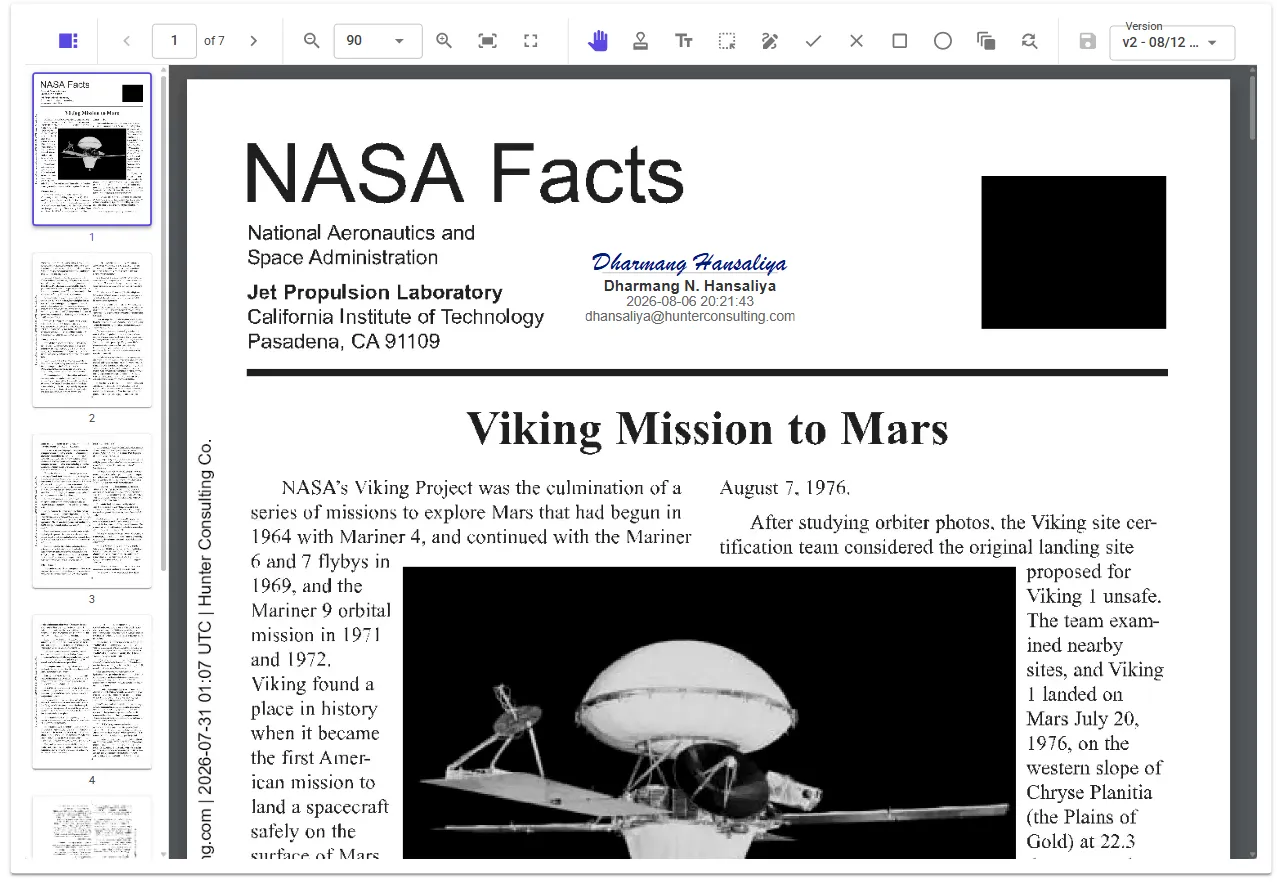
DocuPro document viewer with annotation tools and version history
The viewer's annotation tools, with version history one dropdown away
Annotations
PAIDAPPROVEDREJECTEDSignatureHighlightText noteCheckmarkCrossmarkShapes
Pages and documents
Rotate, rearrange, and hide pages. Replace a page from an external file. Split pages into a new document with the Document Separator, or merge up to five documents already in the system.
Your original is never lost
Every change is version controlled and revertible, and the document as it was first uploaded stays available to print or export.
Learn more about the document viewer →
06 — Migrate

Ready to leave your existing document system?

Bulk import jobs are built for migration. Configure them against the hardware you have, run documents in parallel when CPU and memory allow, and retry failed uploads without starting over.

SCALERepositories with millions of documents, imported as configurable jobs
SPEEDParallel processing tuned to available CPU and memory
SAFETYFailed uploads are listed and retried, not silently dropped
INDEXExisting metadata maps onto your new index and keyword fields

Built for document-heavy work

The platform stays the same. The document types, fields, and workflows change to match the work.

Workers' compensation
FROI · C84 · IME · Hearing notices
Insurance
Claims · Policies · Correspondence
Legal
Matters · Filings · Discovery
Accounting & AP
Invoices · POs · Statements
Human resources
Personnel files · Onboarding · Reviews
Financial services
Applications · Statements · Compliance

The technical layer

For the people who will actually run it
Access
Microsoft Entra ID SSO
User groups
Folders with permissions
Index-based security rules
Structure
Document groups & types
Index / keyword fields
External field lookups
Keyword search
Deep links from other apps
Capture
Direct upload
GoDocuPro VPD print driver
Patch-T batch scanning
Batch indexing
Scanner profiles
Outlook add-in
Per-user import email
Bulk import jobs with retry
Import stamps
Process & viewer
Linear workflows, stages, queues
Custom workflow tasks
Rule-based / round-robin routing
Stage Manager
SMTP notifications & conditions
Annotations, stamps, signatures
Manage / replace pages
Document separator & merge
Version history with revert
Print & export, original retained

See DocuPro set up for your documents

Bring one of your document types and a process you'd like automated. We'll show you what it looks like configured in DocuPro.

Configured around your documents, not a template.Request a demo